-
AuthorSearch Results
-
December 29, 2017 at 1:11 pm #95432
neo
Customer SupportLEAD SUPPORTHi
I have no idea what you mean by
i must install the network, then I have installed network and added a new site for DE, then all content on the page is lost.
Polylang or wpml is pretty straight forward. You activate the plugin and add your languages and then start adding the pages in each language. There is no tutorial at least not from our side. Maybe that plugin developer has some. We just follow the plugin and have no extra code added.
There is no network requirement or any additional install. At least i have never seen such.
try https://www.google.com/search?q=polylang+tutorial for more info.
Note: for existing pages you need to create the translated counter pages for the none default language as set in the polylang settings.
Best regards,
Neo
Theme supportDecember 29, 2017 at 12:54 pm #95430ycyxyd
MemberHello,
I have installed polylang, then shows the wordpress, i must install the network, then I have installed network and added a new site for DE, then all content on the page is lost.
Do you have an accurate tutorial for rt_theme_19 with multilanguage or exactly with polylang?
Best Regards,
DongDecember 27, 2017 at 7:00 am #95409Tolga
Customer SupportDEVELOPERHi,
1) Unfortunately, we don’t have the German .po file. But these strings should be enough for the front end https://cl.ly/110n2H2L253q/rt_theme.po.zip
2) You need to install WPML ( https://wpml.org/ premium ) or PolyLang plugin ( https://wordpress.org/plugins/polylang/ free plugin ) to run a multilingual website.
Please feel free to ask if you have any further questions.
Best Regards,
TolgaDecember 1, 2017 at 8:54 am #94856In reply to: general informations
Customer SupportLEAD SUPPORTHi
You need to buy a multi language plugin to have that. https://wpml.org (the cms version !)
or Use a free one like polylang.
Best regards,
Neo
Theme supportNovember 6, 2017 at 7:32 am #94194In reply to: Menus with WPML
Customer SupportLEAD SUPPORTHi
I just setup a clean install and i cannotrecreate your issues.
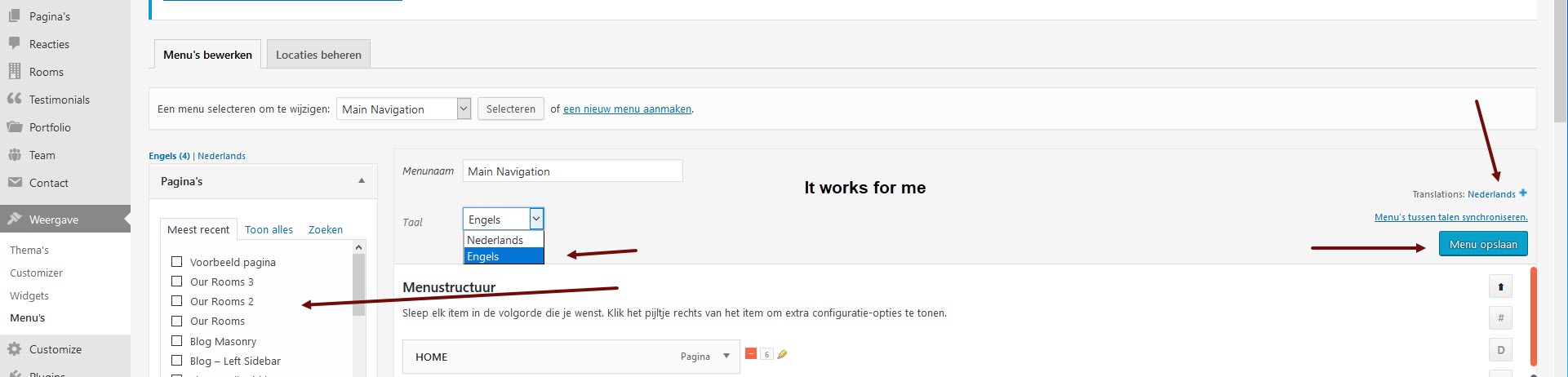
I don’t have empty sections in the menu system. Can you add screenshots of your issues?
To add images to your reply you can use:
1) http://imgur.com or
2) http://prnt.sc/
3) Upload the image in your own website media libraryEither one of the above you can then paste the url to that image in here.
Maybe I dont understand this part of your problem
Do not create, do not translate. In the left side there are empty sections, there is nothing to choose for the menu.
Please advice.
The theme is fully compatible with the wpml or polylang plugin. If you cant create translated menu items maybe start turning off plugins and update to the latest build. Does it work if you use only the wpml plugin with no addons activated?
Did you contact wpml support on this? If not please do so.
Best regards,
Neo
Theme supportOctober 23, 2017 at 8:18 pm #93977In reply to: Have Polylang Plugin _ team not loading
Customer SupportDEVELOPERHi,
You need to translate all team posts as well. You can get more help about the plugin over this forums https://wordpress.org/support/plugin/polylang We don’t provide support for 3rd party plugins unless it is a bug.
Best Regards,
TolgaOctober 22, 2017 at 7:32 pm #93968In reply to: Have Polylang Plugin _ team not loading
somename
MemberI copy pasted same code from the english page to the greek page, and the Team does not show all the doctors in the greek page, using the polylang plugin but pages i type without visual composer work. why is this ?
I thought you mentioned Polylang will work ? I don’t see the photos of each doctor with their links in greek page.
September 23, 2017 at 11:00 am #93359Memberi think it is possible, but with more manual work with polylang, as you need to make 3 separate menus, and add manually pages and select a default language for each menu..
so it must be possible have not tried yet..will give that a go.
August 31, 2017 at 6:12 am #92739In reply to: RT-Theme 19 cannot display Language Menu
Customer SupportLEAD SUPPORTYou need to buy it. Its a separate paid plugin that is not part of the theme nor do we advertise this at our sales page that it is included. You can also use the polylang plugin, but it works different then wpml.
link http://wpml.org or google for wpml.
Best regards,
Neo
Theme supportAugust 23, 2017 at 2:40 pm #92633In reply to: MULTI LANGUAGE
Customer SupportLEAD SUPPORTI just did a quick test and it works fine, other then the bugs reported by users on the polylang support forum.


I cant recreate your issue. Make sure the (static home)page is created for both languages otherwise it wont work and the language menu will be empty. For any further reference consult the polylang documentation and or support.
Best regards,
Neo
Theme support -
AuthorSearch Results
