-
AuthorSearch Results
-
May 25, 2017 at 3:12 pm #91354
In reply to: Theme admin not working properly – error 500
divago
MemberHey Tolga, thx for the feedback.
taking back to the issue, the same happened trying the other two translating plugins (qtrans and polylang).
btw removing wpml solved the issue.see you later.
May 17, 2017 at 1:14 pm #91193In reply to: Translation problem and menu wideness,
neo
Customer SupportLEAD SUPPORTHi
I have setup a clean test website and installed polylang and its working fine !
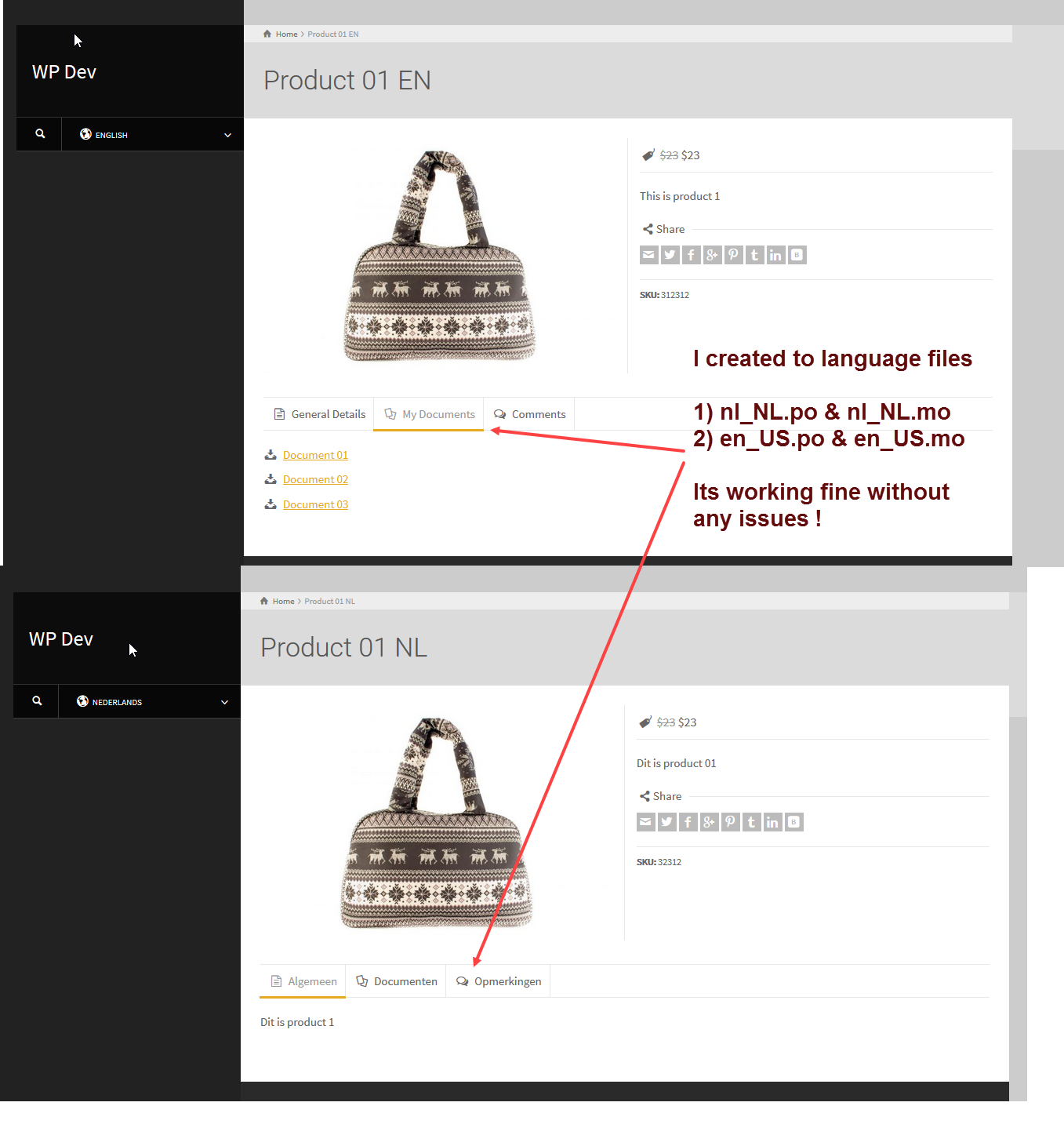
There are no issues with translating of the strings into any language.
Best regards,
Neo
Theme supportMay 10, 2017 at 6:29 am #91053In reply to: How can I add flags (without WPML or other plugins)
Customer SupportLEAD SUPPORTHi
Our demo uses this code to add the flags
PHP12345678910111213141516function icl_get_languages(){}function languages_list(){echo '<ul class="flags"><li><a title="English" href="#" rel="nofollow"><img loading="lazy" decoding="async" width="18" height="12" alt="en" src="http://rttheme17.demo-rt.com/wp-content/plugins/sitepress-multilingual-cms/res/flags/en.png"/></a></li><li><a title="Türkçe" href="#" rel="nofollow"><img loading="lazy" decoding="async" width="18" height="12" alt="tr" src="http://rttheme17.demo-rt.com/wp-content/plugins/sitepress-multilingual-cms/res/flags/tr.png"/></a></li></ul>';}Note: you will have to have language flags icons uploaded in your website and then adjust above code accordingly. Also change the href in the a-tag to point to the right url so the flags link to the correct address/url.
If you use any plugin like polylang or wpml remove the code.
Add the code to the theme functions.php or the functions.php of the child theme.
Best regards,
Neo
Theme supportApril 9, 2017 at 12:38 pm #90417Customer SupportLEAD SUPPORTHi
Content needs to be translated by the wpml.org (WPML) plugin or polylang plugin. You can NOT translate WEBSITE CONTENT by poedit or loco edit.
Poedit, Loco Translateon one side and WPML or Polylang on the other side are different programs. The first two are for translating default theme strings (which are located by the poedit or loco edit through a theme text domain name set in the theme php files) the last two are to translate website content into various languages (they create translate pages /posts of your content).
There is NO way to translate content by poedit or loco translate. It is simply not possible.
Best regards,
Neo
Theme supportApril 5, 2017 at 11:28 pm #90386Customer SupportLEAD SUPPORTHi
Theme strings can be translated using po edit or loco translate http://support-rt.com/forums/topic/translating-themes-by-using-po-files/
Your website content can be translated using a plugin. http://wpml.org
You can also use polylang, but from the outset this theme is developed to be best used by wpml.
Best regards, Neo
March 16, 2017 at 4:01 am #89776In reply to: the language- when i use the polylang
EDDIELIN
MemberHi,
how to use polylang but not showing the flags?
Best Regards,
Eddie LIN
February 23, 2017 at 12:27 pm #89353In reply to: multiple languages rt-16
Customer SupportLEAD SUPPORTHi
I think you should checkout the polylang settings and enable it for those custom post types. If that does not resolve your issue i have no fix. The polylang plugin is not 100% supported yet. You will have to swap to wpml as that is the plugin we can support at the moment. Aplogies for any inconvenience.
Note: the above code snippets adjustments are provided as is as the theme author does not have buildin support at the moment.

Best regards,
Neo
Theme supportFebruary 23, 2017 at 11:35 am #89350In reply to: multiple languages rt-16
Customer SupportLEAD SUPPORTHere is the complete modified wpml_functions.php file to make it work.
PHP123456789101112131415161718192021222324252627282930313233343536373839404142434445464748495051525354555657585960616263646566676869707172737475767778798081828384858687888990919293949596979899100101102103104105106107108109110111112113114115116117118119120121122123124125126127128129130131132133134135136137138139140141142143144145146147148149150151152153154155156157158159160161162163164165166167168169<?php#-----------------------------------------# RT-Theme wpml_functions.php# version: 1.0#-----------------------------------------## WPML match page id#function wpml_page_id($id){global $polylang;if(function_exists('icl_object_id') && !isset($polylang)) {global $sitepress;$get_default_language = $sitepress->get_default_language();return icl_object_id($id,'page',true,$get_default_language);} else {return $id;}}## WPML match post id#function wpml_post_id($id){global $polylang;if(function_exists('icl_object_id') && !isset($polylang)) {global $sitepress, $post;$get_default_language = $sitepress->get_default_language();$post_type = isset( $post->post_type ) ? $post->post_type : "post" ;return icl_object_id($id,$post_type,true,$get_default_language);} else {return $id;}}## WPML match category id#function wpml_category_id($id){global $polylang;if(function_exists('icl_object_id') && !isset($polylang)) {global $sitepress;$get_default_language = $sitepress->get_default_language();return icl_object_id($id,'category',true,$get_default_language);} else {return $id;}}## WPML match product category id#function wpml_product_category_id($id){global $polylang;if(function_exists('icl_object_id') && !isset($polylang)) {global $sitepress;$get_default_language = $sitepress->get_default_language();return icl_object_id($id,'product_categories',true,$get_default_language);} else {return $id;}}## WPML match portfolio category id#function wpml_portfolio_category_id($id){global $polylang;if(function_exists('icl_object_id') && !isset($polylang)) {global $sitepress;$get_default_language = $sitepress->get_default_language();return icl_object_id($id,'portfolio_categories',true,$get_default_language);} else {return $id;}}## WPML match categories#function wpml_lang_object_ids($ids_array, $type) {global $polylang;if(function_exists('icl_object_id') && !isset($polylang)) {global $sitepress;if( ! is_array( $ids_array ) ){return $ids_array;}$get_default_language = ICL_LANGUAGE_CODE;$res = array();foreach ($ids_array as $id) {$xlat = icl_object_id($id,$type,false,$get_default_language);if(!is_null($xlat)) $res[] = $xlat;}return $res;} else {return $ids_array;}}## Get WPML Plugin Flags#function languages_list(){$languages = icl_get_languages('skip_missing=0&orderby=code');if(!empty($languages)){echo '<ul class="flags">';foreach($languages as $l){echo '<li>';if($l['country_flag_url']){echo '<a href="'.$l['url'].'" title="'.$l['native_name'].'" class="j_ttip" rel="nofollow"><img loading="lazy" decoding="async" src="'.$l['country_flag_url'].'" height="12" alt="'.$l['language_code'].'" width="18" /></a>';}echo '</li>';}echo '</ul>';}}## WPML Home URL#function wpml_get_home_url(){global $polylang;if(function_exists('icl_get_home_url') && !isset($polylang)){return icl_get_home_url();}else{return rtrim(get_bloginfo('url') , '/') . '/';}}## WPML String Register#function wpml_register_string($context, $name, $value){global $polylang;if(function_exists('icl_register_string') && trim($value) && !isset($polylang)){icl_register_string($context, $name, $value);}}## WPML Get Registered String#function wpml_t($context, $name, $original_value){global $polylang;if(function_exists('icl_t') && !isset($polylang)){return icl_t($context, $name, $original_value);}else{return $original_value;}}## String Registration#wpml_register_string( THEMESLUG , 'Footer Copyright Text', stripslashes(get_option(THEMESLUG.'_footer_copy')));wpml_register_string( THEMESLUG , 'Breadcrumb Menu Text', get_option(THEMESLUG.'_breadcrumb_text'));?>February 23, 2017 at 11:31 am #89349In reply to: multiple languages rt-16
Customer SupportLEAD SUPPORTHi
As explained in above given link change every function in the rttheme16/rt-framework/functions/wpml_functions.php and add a check if polylang is active.
f.e. the first function change from this
1PHP12345678910function wpml_page_id($id){if(function_exists('icl_object_id') ) {global $sitepress;$get_default_language = $sitepress->get_default_language();return icl_object_id($id,'page',true,$get_default_language);} else {return $id;}}to this
1PHP1234567891011function wpml_page_id($id){global $polylang;if(function_exists('icl_object_id') && !isset($polylang)) {global $sitepress;$get_default_language = $sitepress->get_default_language();return icl_object_id($id,'page',true,$get_default_language);} else {return $id;}}You can repeat for all the other functions or replace the content of that file with this one
Best regards,
Neo
Theme supportFebruary 23, 2017 at 11:27 am #89348In reply to: multiple languages rt-16
Damlacik
Memberhi,
What to change in functions.php
To use polylang? Because I could not find the code on the link in functions.php.
And How homepage will be multilingual? I installed polylang.
thanks -
AuthorSearch Results
